One bStocks holding, three numbers: why your wallet, BscScan and Binance don't match

Your TSLAB shows one number in your Binance account. Withdraw it to your own wallet and the wallet may show a different number, and when you look it up on BscScan, that may not match the wallet either. A lot of people's first thought is that something was deducted, or that coins went missing. Most of the time, neither is true.
The reason is how the balance is recorded. A bStocks contract records a raw balance, and Binance uses an adjustment factor called the multiplier to fold in corporate actions such as dividend reinvestment and stock splits. Your Binance account, BscScan and wallets that have integrated the BEP-677 standard show the number with the multiplier applied; wallets that haven't may only show the raw number. That's usually why the amounts don't line up, not because coins have gone missing.
The sections on how it works (the three balances, the definition of the multiplier and its examples, the pause table, transfer controls) are based on the Simplified Chinese version of Binance's bStocks FAQ (marked on the page as updated 2026-07-29), so the wording quoted from it here is our own English translation. The troubleshooting steps and the points to check before going into DeFi are our suggestions built on that page; the official page doesn't include them. Every specific number in this article is an illustrative example from the official page, not the actual multiplier of any particular token.
Wallet, BscScan, Binance: where each of the three numbers comes from
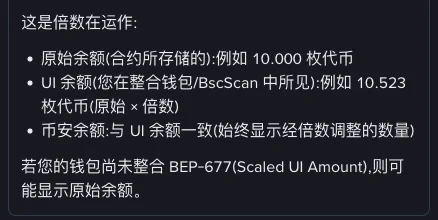
Binance's FAQ has a question devoted to exactly this, which translates as: why is the balance of my bStocks tokens different in my wallet, on BscScan and on Binance? The answer lists the three balances separately:
| Balance | Where you see it | Multiplier applied? | Official example |
|---|---|---|---|
| Raw balance | The number stored in the contract; wallets without BEP-677 may show it as is | No | 10.000 tokens |
| UI balance | BscScan, and wallets that have integrated the standard | Yes (raw × multiplier) | 10.523 tokens |
| Binance balance | Your Binance account | Yes, always shows the adjusted amount | Same as the UI balance |
Laid out like this, it's clear: of the three numbers, only the raw balance is measured differently. BscScan and Binance use the same basis, and in another answer Binance also states that the BNB Chain block explorer has integrated the multiplier natively and shows the UI balance by default.
So the most common situation is that Binance and BscScan agree, and only the wallet's number is different. That wallet is very likely showing the raw balance. As for what the multiplier currently is on the bStocks you hold, the official FAQ doesn't give a table of values for each token, and we won't estimate one for you.
What the multiplier is, and how the displayed amount is calculated
The official definition is short: the multiplier is an adjustment factor that reflects certain corporate actions on bStocks, converting the raw on-chain token amount into an adjusted amount used for display and for some platform calculations. As a formula:
Displayed balance = raw balance × multiplier
The multiplier is adjusted for events such as dividend reinvestment, stock splits and reverse splits. Binance follows that straight away with a string of qualifications: the adjustment is subject to the legal documents, taxes, withholding tax, fees, rounding, timing, operational constraints and the issuer's discretion. The displayed balance is the result of converting under those rules, with rounding, taxes and fees along the way, so don't compare it digit by digit with the number of shares you've worked out in your head.
One thing about this mechanism confuses people: the amount changes, yet on-chain it looks as if nothing happened. The FAQ is blunt about it: when dividends are reinvested, you won't see a dividend transaction in your wallet, no new tokens are minted, and there's no transfer event. So if you notice the displayed amount of your TSLAB has gone up but can't find any incoming transaction in your history, that is exactly what a multiplier adjustment looks like. Nobody sent you tokens, and the page isn't showing an error.
When does the multiplier change? For dividends, Binance says it's updated shortly after the record date, and holders don't need to do anything.
Whether a wallet can apply the multiplier depends on whether it has integrated BEP-677. That's a proposal number in the BNB Chain proposals repository; the standard is called Scaled UI Amount, and the original text is on the BEP-677 page in the BNB Chain BEPs repository. According to the official FAQ, wallets that have integrated this standard automatically show the correct effective balance; those that haven't may only show the raw balance.
Dividends, splits, reverse splits: the raw number stays put, the displayed number moves
In bStocks, all three kinds of corporate action go through the same multiplier mechanism; the only difference is which way the multiplier moves.
- Dividends. No cash is paid out. The issuer generally expects to reinvest the net dividend (after withholding tax, fees and similar deductions), which shows up as an increase in the multiplier. The official table puts it this way: once the ex-dividend date has passed, and you held the tokens before it, the multiplier increases and the displayed balance goes up, while the raw on-chain balance stays the same. In one place Binance says the multiplier is updated shortly after the record date, while the table goes by the ex-dividend date; what matters for you is that you have to hold before the ex-dividend date, and check the announcement for the exact date it takes effect.
- Stock splits. Binance's example: if NVDA did a 10:1 split (1 share becomes 10), the multiplier would increase tenfold, the displayed balance would go from 1 to 10, and the price per unit would become one tenth of what it was.
- Reverse splits. The same multiplier mechanism, in the opposite direction.
Further down, the official FAQ gives two comparison tables that set your Binance account and an external wallet side by side, which show neatly why you end up with two numbers. The table below is put together from those official examples. Before the event, both sides hold 10 tokens with a multiplier of 1.0. All the numbers are Binance's illustrative figures, assuming no market movement, spreads or fees, and, except where the page says otherwise, no tax, withholding tax or rounding:
| Official example | Shown in Binance account | External wallet raw balance | Multiplier | Effective balance | Price per token |
|---|---|---|---|---|---|
| A: 10 TSLAB at $250 per share, 2:1 split | 20 TSLAB | 10 | 2.0 | 20 | $125 |
| B: 10 TSLAB, $2 dividend per share | 10.08 TSLAB | 10 | 1.008 | 10.08 | about $248 |
In both examples the holding is worth $2,500 (again illustrative figures; the examples leave tax out, and what actually gets reinvested is the net amount after tax). Example B says the most: the dividend doesn't turn into a cash payment but into an extra 0.08 tokens of displayed holding, while the price per token dips slightly. A wallet that only shows the raw balance would keep telling you, in this example, that you have 10 tokens.
10.523, 2.0 and 1.008 are all numbers Binance wrote to explain the mechanism. You can't work out from them what the multiplier on any bStocks token is right now, or how many times it has been adjusted. To check your own, look at the figures on BscScan and in your Binance account, and compare them with Binance's announcements for that token.
Binance also addresses withholding tax: all dividends are subject to withholding tax before reinvestment, at the standard US-source income withholding rate for non-US persons. For how that applies to you personally, ask a qualified professional. For how token dividends differ from real-share dividends in form and tax, see dividends on tokenized US stocks: how you receive them, how they're calculated and how they differ from real shares; the messier cases such as delistings and takeovers are covered separately in splits, reverse splits, delistings, takeovers: what happens to the bStocks you hold.
When your wallet's number doesn't match, cross-check it against two sources
Which wallets have integrated BEP-677 and which haven't changes with each release, so we don't keep a list here. Rather than memorizing a list, check for yourself. The idea is to use two references you know apply the multiplier: BscScan and your Binance account.
- Search for your own wallet address on BscScan and find the balance of that bStocks token. According to Binance, the BNB Chain block explorer shows the UI balance by default, meaning the figure with the multiplier applied.
- Make sure you're looking at the same contract. Token names and icons can be copied, so go by the contract address of the tokens you actually received when you withdrew from Binance.
- Put the wallet's figure next to BscScan's. If they match, the wallet is already applying the multiplier; if they don't, and BscScan agrees with Binance, the wallet is most likely showing the raw balance.
- When you use Binance as the reference, compare against the amount of this withdrawal in your Binance withdrawal history, not the balance left in your account. According to Binance, both Binance and BscScan show the multiplied figure; for any gap between the two, check the fee shown on the withdrawal page at the time first, then whether a corporate action updated the multiplier in the meantime.
- If, after checking, only the wallet is different, it's a display issue and nothing is missing. Don't import a same-name contract you found by searching just to fix the number, and don't send another transfer to test it.
A wallet showing the raw balance hasn't miscalculated; it just hasn't done that one multiplication. The on-chain record itself is fine. If the number makes you uneasy, judge the value of your holding by BscScan and your Binance account.
During a corporate action, deposits from your wallet back to Binance get stuck
A mismatch in the displayed amount doesn't change your holding by itself. What can actually leave you stuck is the pause while a corporate action is being processed. Binance gives a table of typical cases:
| Event | Deposits | Withdrawals | Conversions | Spot trading |
|---|---|---|---|---|
| Dividend reinvestment (ex-dividend date) | Paused | Paused | Paused | Available |
| Stock split | Paused | Paused | Paused | Paused |
| Reverse split | Paused | Paused | Paused | Paused |
If you're sending tokens back from your wallet, the Deposits column is the one that applies to you. During these windows, the route for depositing bStocks from your wallet back to Binance to sell them is closed; with splits and reverse splits, Binance spot trading itself stops too. Binance adds two more points: the scope and length of a pause can vary from event to event, and spot trading may also be paused or restricted while some dividends are processed; everything resumes once processing is complete.
There isn't much you can do, but what you can do works: before you plan a transfer, check Binance's announcements for any upcoming corporate action on that token (Binance says it gives advance notice where it can, but doesn't guarantee it every time), and if you hit a window, wait until processing is finished before you move anything. If you've already started a transfer during a pause, the official FAQ doesn't say how that's handled, so don't keep resending it; go by what Binance support and your deposit history tell you. For which network to choose when withdrawing to a wallet in the first place, and how to read the fees, see withdrawing to a Web3 wallet: BNB Chain, fees, arrival time.
Before you put it into PancakeSwap or Venus, ask which number it counts
Once you move bStocks from your wallet on into DeFi, the way the amount is counted is no longer just a question of what looks right on screen. There's a detail in the official definition: the adjusted amount produced by the multiplier is used for display and for some platform calculations. Whether a particular protocol keeps its books on the raw number or the adjusted one, the official FAQ doesn't say, and we won't draw conclusions on the protocol's behalf.
What the official FAQ does settle is something else: a third-party platform or DeFi protocol that integrates bStocks has to arrange the integration with bStocks itself and has to enforce geographic restrictions in its own application; Binance provides a public REST API for checking country and region eligibility for this purpose. In other words, how bStocks are handled on the protocol's side is governed by the protocol's own documentation.
Three small things you can do before you act: check whether the bStocks amount shown in the protocol's interface matches BscScan; read what the protocol's documentation says about this kind of token; and remember that the multiplier changes with corporate actions, so positions sitting in a pool or posted as collateral need a second look when one comes up. How providing liquidity and lending each work is covered on this site in taking bStocks to PancakeSwap to provide liquidity: steps, how it works and impermanent loss and bStocks lending on Venus: collateral factor, APY and liquidation risk.
Display differences don't change your holding; transfer controls are what can lock up assets
Everything so far has been two ways of reading the same asset. What can actually cost you control of it is transfer controls. The official FAQ is clear about this in its section on protections:
- bStocks are subject to transfer controls, and transfers may be restricted, refused, delayed, frozen, suspended, blacklisted or otherwise blocked;
- the issuer can add wallet addresses whose activity may breach laws or sanctions requirements to a smart contract blacklist;
- tokens held by, or transferred to, ineligible or prohibited addresses may not be recognized in the Binance CSD environment and may be frozen or restricted at the smart contract level, and the holder may lose the ability to transfer, trade, convert or redeem them, or to receive any economic benefit.
Two more bottom lines are on the same page: bStocks are not offered in the United States or to US persons, and neither SIPC nor FDIC protection applies. For the background on geographic restrictions, see why the US and some regions can't buy tokenized US stocks: geo-restrictions and compliance.
Saying display differences don't change your holding assumes you value it by the multiplied figure; if you price a transfer or a protocol deposit off the raw number, you can lose out. It helps to keep two kinds of situation apart. If your wallet's number differs from BscScan's but there's no outgoing transfer on-chain, that's a display matter. If BscScan shows an outgoing transfer you never made, take it seriously. Our suggestion: investigate on the assumption that your private key or an approval may have been compromised, and don't send any more assets to that address. If a transfer is refused or assets are frozen, go back and check whether your address and your region are eligible, going by Binance's official guidance.
*up to 20% spot trading fee discount; the actual rate is whatever the Binance page shows and may change with policy.
FAQ
My bStocks balance dropped after I withdrew to my wallet. Was something deducted?
Most likely not. A bStocks contract stores the raw balance, while your Binance account shows the adjusted amount with the multiplier applied. If your wallet hasn't integrated BEP-677 (Scaled UI Amount), it may only show the raw balance, which looks smaller than what Binance showed. Start by looking up your own address on BscScan, which shows the multiplied figure by default.
The TSLAB amount in my wallet went up, but there's no incoming transaction. Is that normal?
First confirm it's the same contract address. If it is, this is what a multiplier adjustment looks like. Binance's FAQ explains that dividend reinvestment is reflected through the multiplier: no dividend transaction appears in your wallet, no new tokens are minted and there's no transfer event. A stock split likewise raises the multiplier. The raw balance stays the same while the displayed balance goes up.
My balance on BscScan doesn't match what Binance shows. Which one should I trust?
According to Binance, both show the multiplied figure. If they don't match, first make sure you're looking at the same contract and the same address. When you use Binance as the reference, compare against the amount of this withdrawal in your Binance withdrawal history, not the balance left in your account. For any gap between the two, check the fee shown on the withdrawal page at the time first, then whether a corporate action updated the multiplier in between. If they still don't match, go by what Binance's official support tells you.
Will dividends be paid to my wallet in cash?
No. Binance's FAQ says dividends aren't paid out directly in cash; the issuer generally expects to reinvest the net amount after withholding tax, fees and similar deductions, which shows up as an increase in the multiplier. For your personal tax situation, ask a qualified professional.
Can I deposit bStocks from my wallet back to Binance during a corporate action?
In the typical cases Binance lists, deposits, withdrawals and conversions are all paused during dividend reinvestment (on the ex-dividend date), stock splits and reverse splits, and spot trading is paused as well during splits and reverse splits. The scope and timing can differ, and everything resumes once processing is complete. Check Binance's announcements before you transfer; Binance says it will give notice in advance where it can, but doesn't guarantee it every time.